Case study 03, 2026
Mini ERP Apotek — Point of sale, stock and books for an independent pharmacy with two stores
An internal web app shaped around the owner's admin pain: deliveries, expenses, and finding the cheapest supplier.
- Role
- Product, design and build, working with AI coding agents
- Team
- Solo, with AI agents for build and QA
- Timeline
- Since October 2026
- Status
- In progress
Context
An independent pharmacy in Indonesia runs one store and is opening a second. I asked the owner where the work felt long and fiddly, and the answer was admin: stock coming in and stock going out.
From that chat I wrote a PRD, then built the app with AI coding agents in short decision rounds. Every rule we settled became a numbered decision on the task board, and there are more than 80 of them now.
The problem
The owner named three pains: entering deliveries takes too long, expenses have to be logged every day, and it is hard to tell which supplier is cheapest. Supplier prices arrive as a salesman's Excel file or link, priced per box, while the store sells per strip or tablet.
The quieter risk was adoption. If the person at the counter skips the POS, stock numbers drift and every report after that is wrong, so the cashier screen had to be faster than the manual way.
Framing
Stock should change because something happened, a delivery or a sale, never because someone typed a new number. That made deliveries and the POS the core of the app, and reports a by-product.
The second frame was trust between three roles: owner, store admin and counter staff. Staff can do their job, and anything that moves money or prices leaves a trail the owner can check.
Key decisions
Decision 1
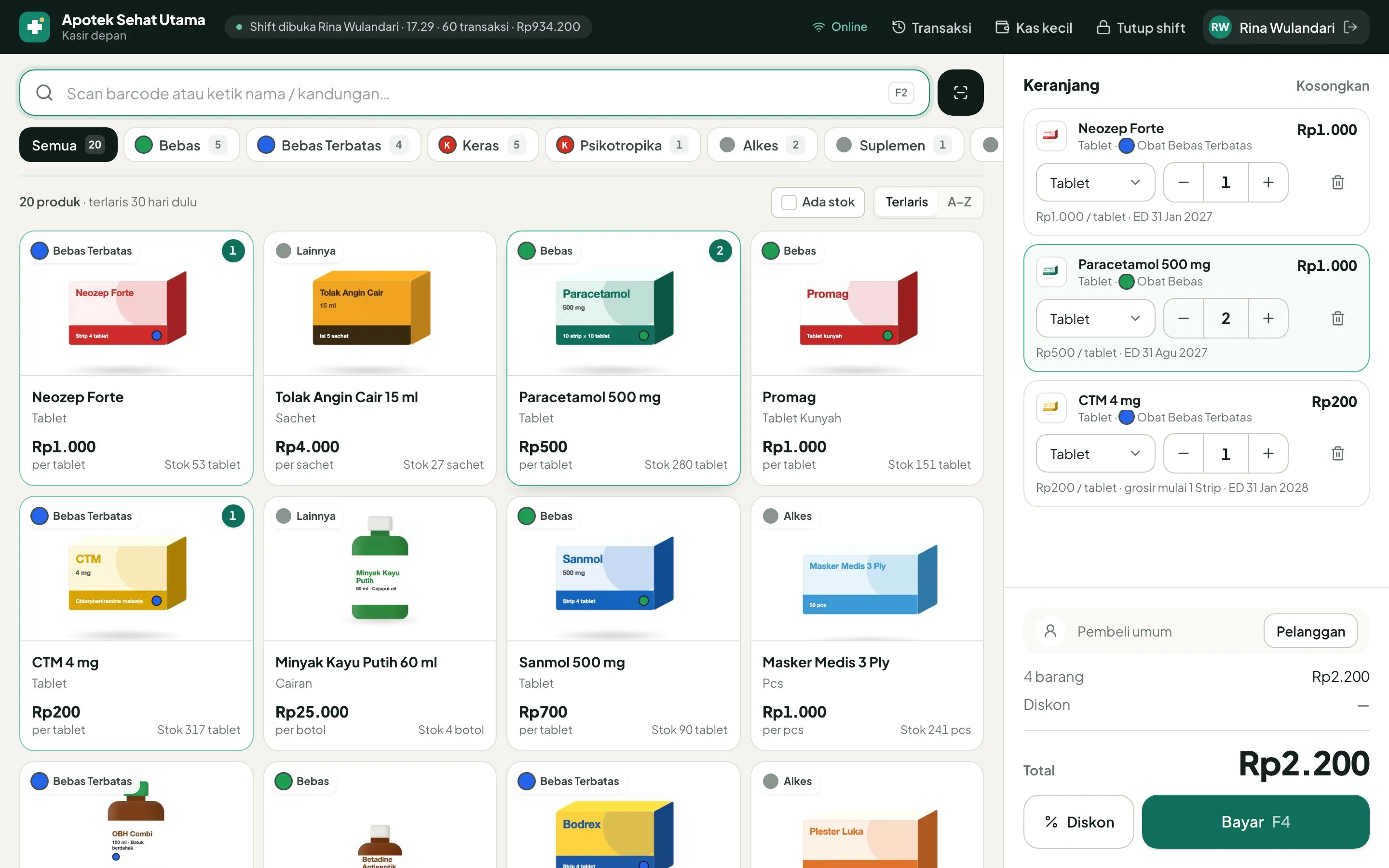
The POS opens right after login
The first build sent the cashier through a menu first. I changed it so the POS is simply there after login. The drawer check is a small box above it, "Should be Rp…", answered with Matches or Different, and the full count happens when the shift closes.
Decision 2
Admin price changes become proposals
A store admin can propose a new selling price, but only the owner approves it, and a rejection shows up on the product form and the admin's home screen. Deliveries still update stock and supplier debt right away. The cost is a wait: the old price holds until the owner approves.
Decision 3
Fraud signals as rules only the owner sees
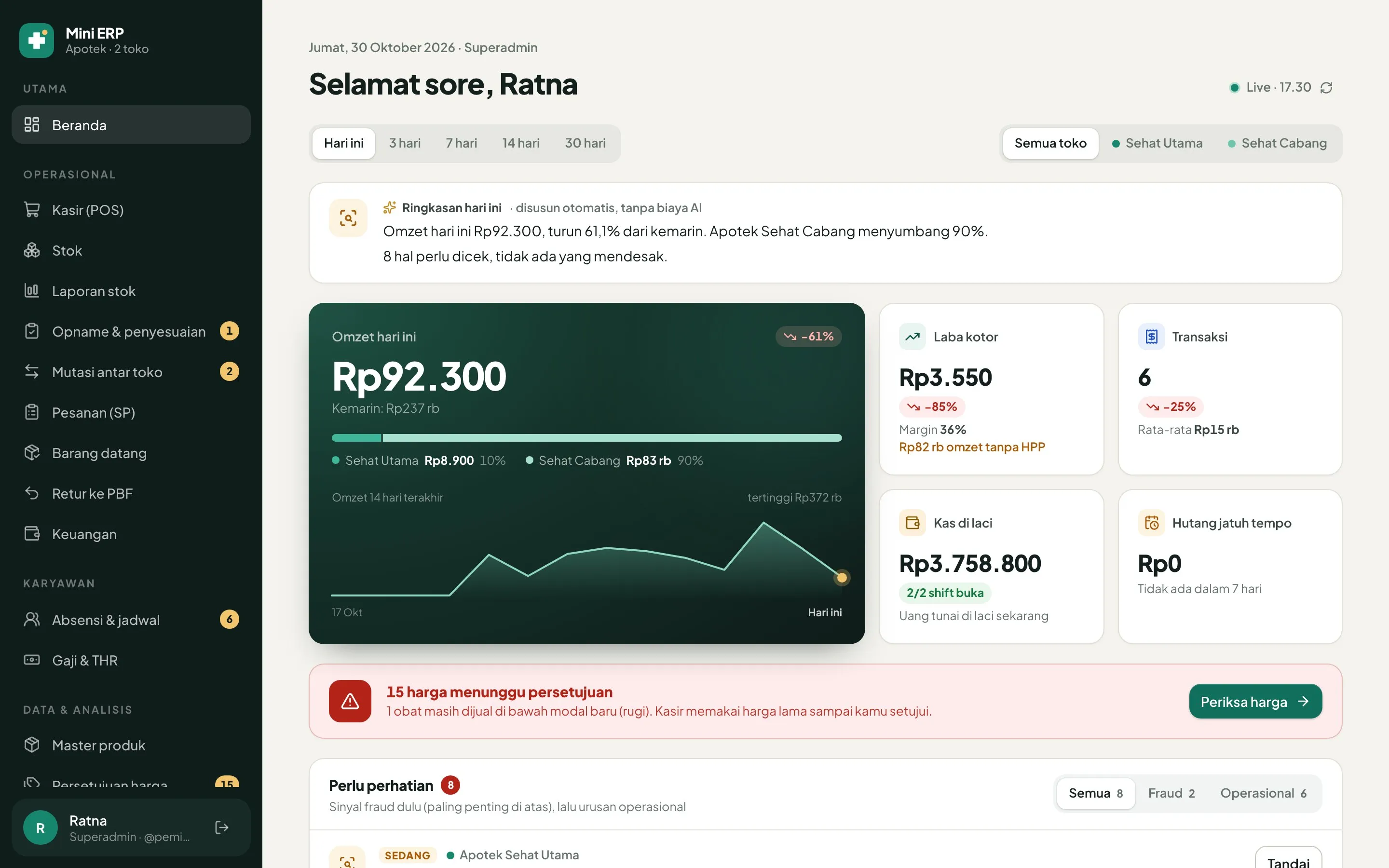
Signals such as a purchase price more than 10% above another supplier's best offer, sales outside opening hours, or repeated PIN failures are plain rules with the reason attached. Only the owner sees them, and each one can be marked as fine or followed up. AI can come later, once its cost is approved.
The solution
A cashier screen for two kinds of device
It runs on a laptop with a USB scanner, keyboard only, or on an Android phone or tablet with the camera. Sales keep saving when the internet drops and sync when it comes back; while offline, the cashier can't be switched.
Deliveries from a phone
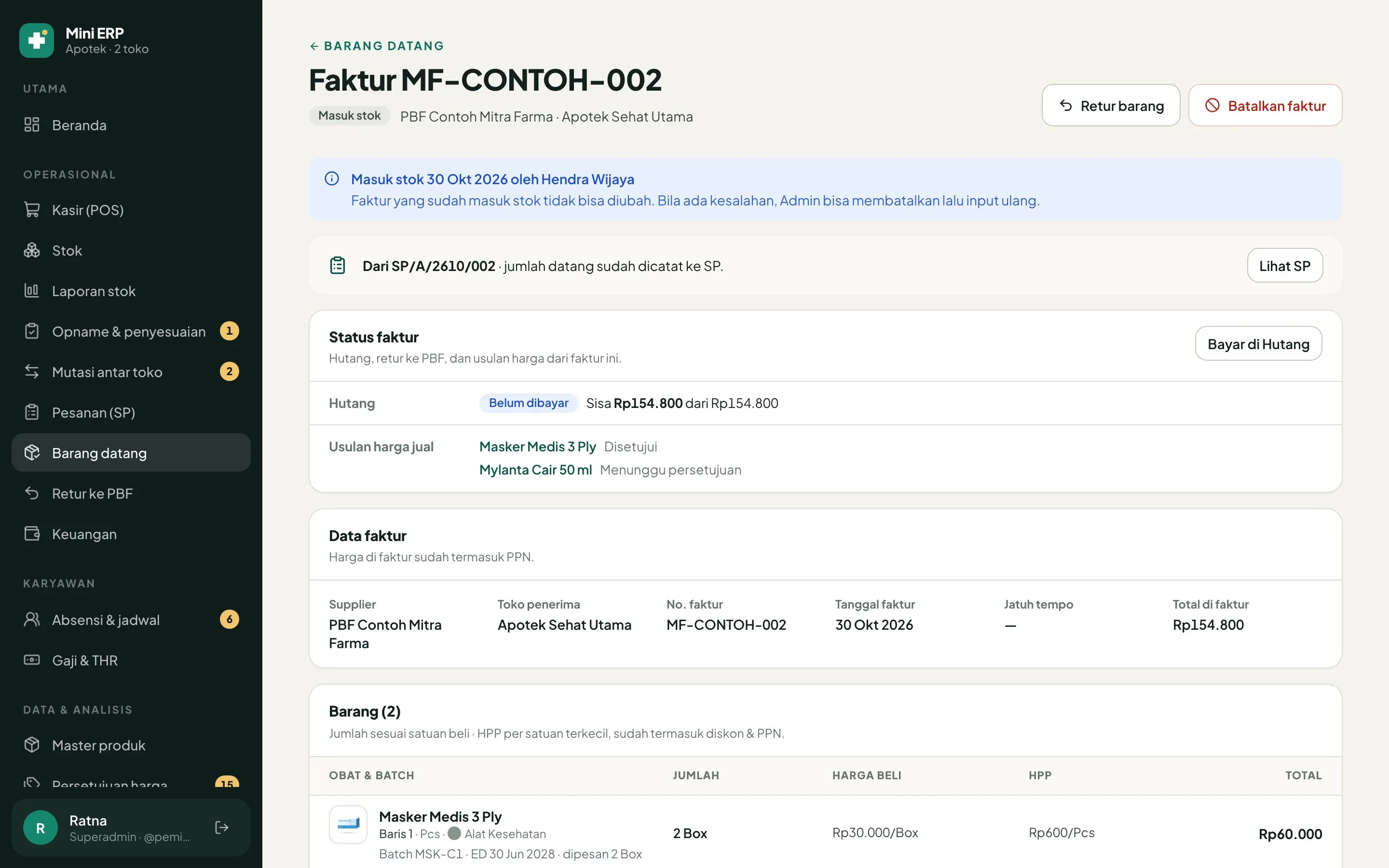
Staff scan the box with a phone camera, and the 2D BPOM barcode fills in batch and expiry date. Stock goes up by batch and the supplier debt is recorded in the same step.
The cheapest supplier, side by side
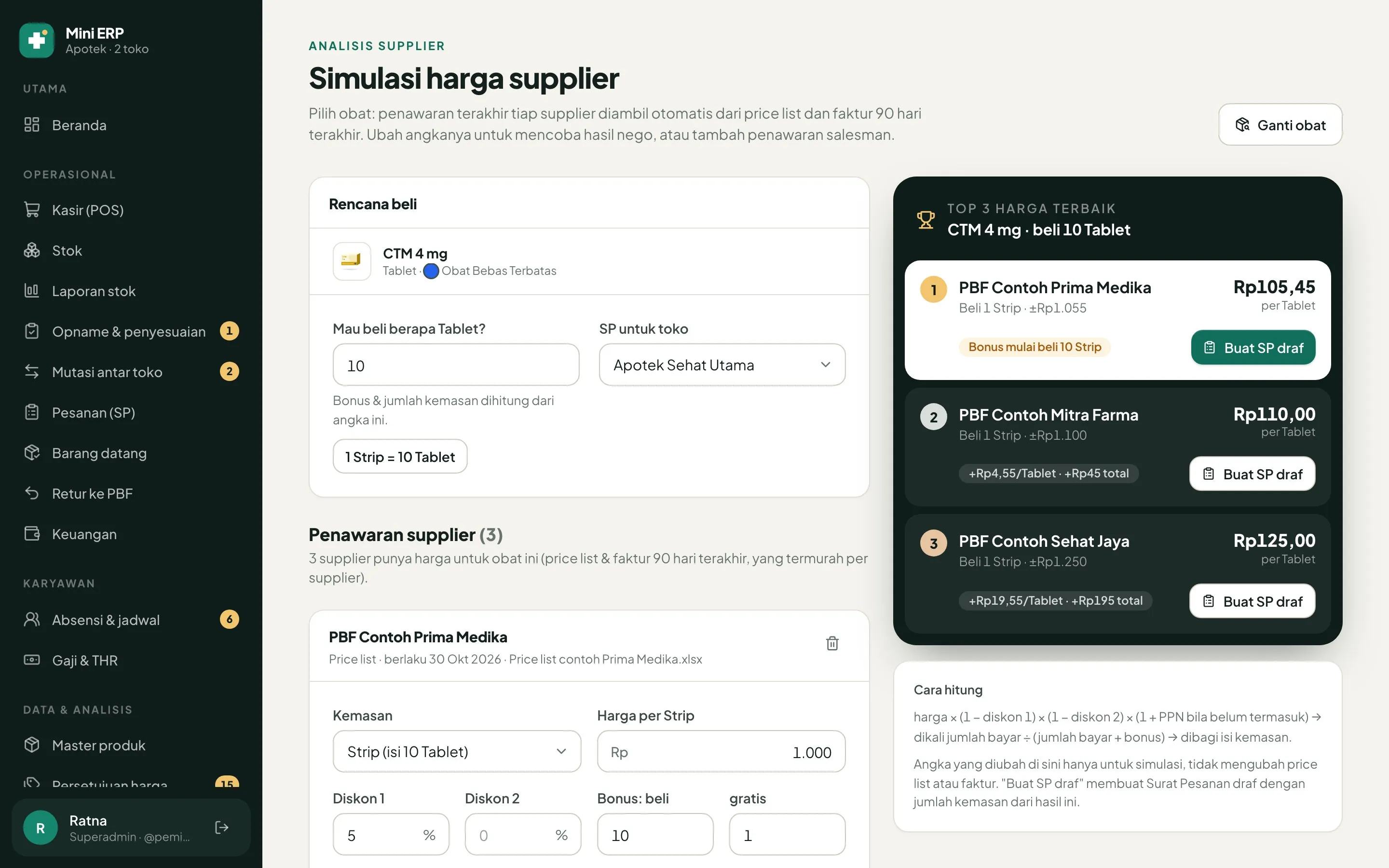
Salesmen send price lists as Excel files or links. The app reads them into one table, asks a person to confirm any product name that only looks similar, and shows the three best recent offers per item, ready to become a purchase order draft.
A home screen that flags, with reasons
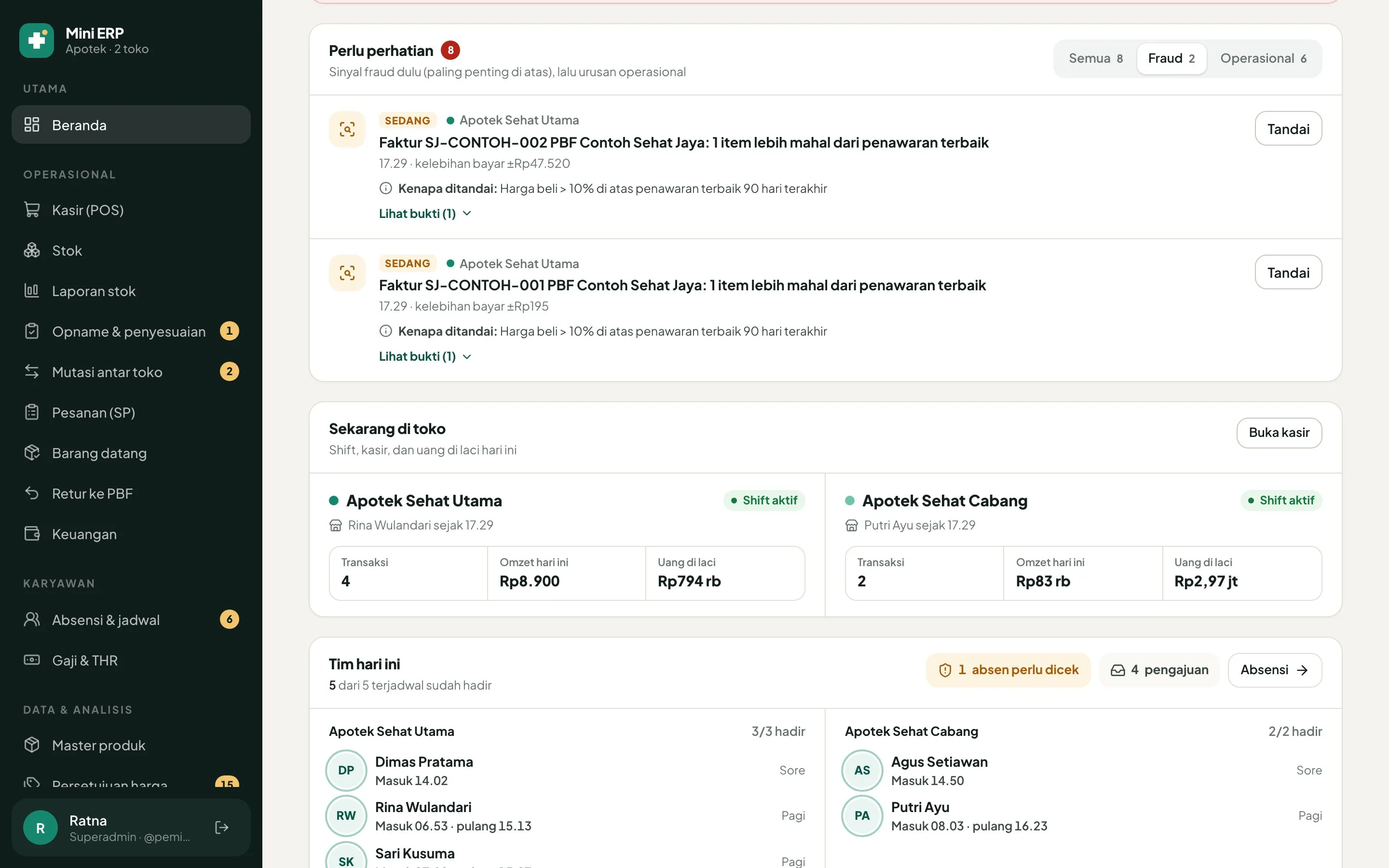
The owner's home screen refreshes about every minute and lists what needs a look: low stock, items near expiry, invoices to check and debts coming due. Fraud signals sit there too, each with the rule that raised it.
Where it stands
- User flows documented across 15 modules
- 33
- Regression suites passing on 28 Oct 2026
- 63
- Running on a test server; the first store goes live after a trial with real data
- In progress
Reflection
Building fast with AI made audits matter more. A full audit on 28 October ran 91 checks of POS numbers against the books and found 12 mismatches, including gross profit that ignored receipt discounts, and both rounds of fixes are now merged.
The rules of the trade changed the design too. Moving stock between the two stores looked simple, then turned out to conflict with a 2026 BPOM regulation that allows it only in narrow cases, so that flow is on hold.
Once it's live, I want to measure two things against a first-week baseline: minutes per delivery entry, and the share of sales that go through the POS.